Selected WorkProject 08Document Automation
SharePoint Automation
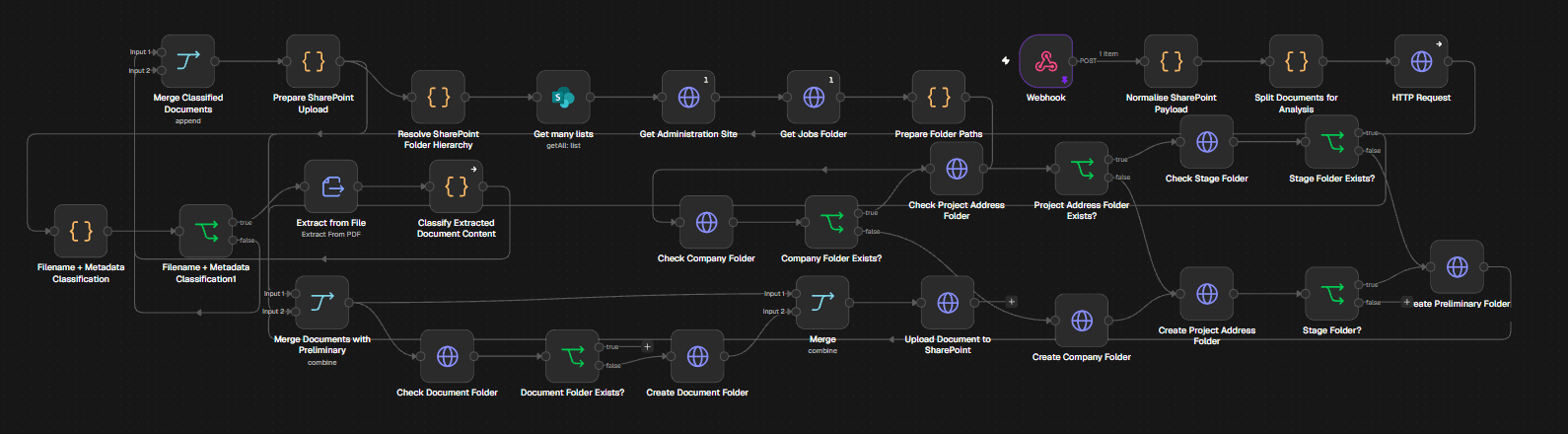
Document Automation workflow built in n8n.
Receives documents by webhook, extracts and classifies their content and file metadata, then resolves the SharePoint folder hierarchy — company, project address, stage and document folders — creating any that are missing before uploading each document to its folder.
01Context
- 01Project type
- Automation Work
- 02Tools
- n8n
- SharePoint
- Webhooks
- 03Stages
- 04
- 04Steps
- 12
02Workflow
Step by step.
Every stage below is read straight off the node names in the workflow, in the order they run.
04 stages12 steps
- 3 steps
01Intake
- Webhook
- Normalise SharePoint payload
- Split documents for analysis
- 3 steps
02Classify
- Extract from file
- Classify extracted document content
- Filename + metadata classification
- 3 steps
03Resolve folders
- Get administration site and jobs folder
- Check company, project address, stage and document folders
- Create any folder that is missing
- Output
04File
- Merge classified documents
- Prepare SharePoint upload
- Upload document to SharePoint
03My role
What I was responsible for.
- Workflow Design
- Systems Integration
- Tools
- n8n
- SharePoint
- Webhooks
Contact
Have a workflow, dashboard or CRM that needs fixing? Let’s talk.
Available for new projects
Tell me about the operation, the systems involved and where the work gets stuck. A short call is usually enough to see whether I can help.