Selected WorkProject 09Document Automation
AI-Powered PDF-to-Structured Data Automation
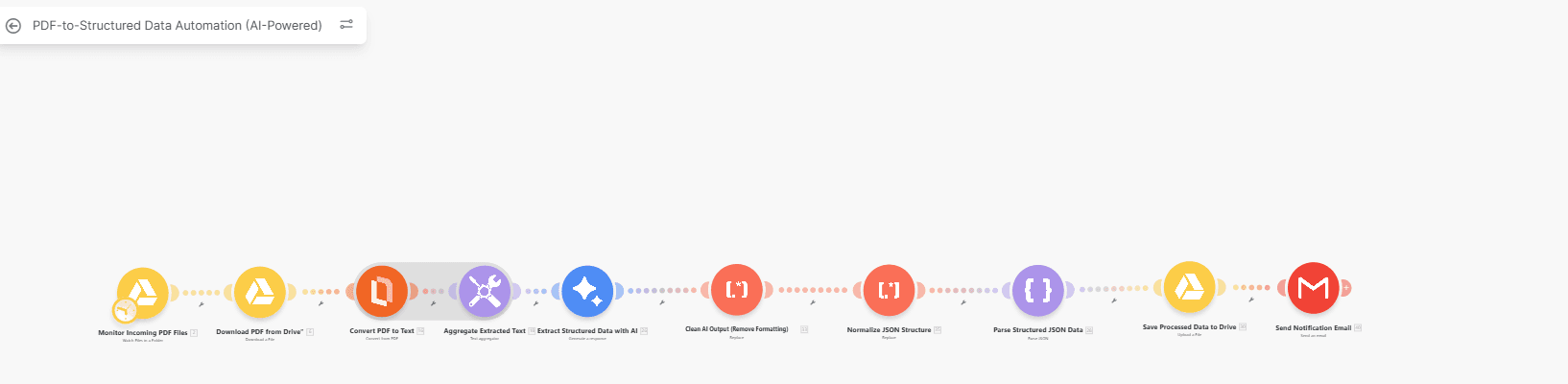
Document Automation workflow built in Make.
Watches a Google Drive folder for incoming PDFs, converts each one to text and uses AI to extract structured data, then cleans and parses the JSON, saves the result back to Drive and sends a notification email.
01Context
- 01Project type
- Automation Work
- 02Tools
- Make
- Google Drive
- AI
- Gmail
- 03Stages
- 04
- 04Steps
- 10
02Workflow
Step by step.
Every stage below is read straight off the node names in the workflow, in the order they run.
04 stages10 steps
- 2 steps
01Trigger
- Monitor incoming PDF files (Google Drive)
- Download PDF from Drive
- 3 steps
02Extract
- Convert PDF to text
- Aggregate extracted text
- Extract structured data with AI
- 3 steps
03Structure
- Clean AI output
- Normalize JSON structure
- Parse structured JSON data
- Output
04Deliver
- Save processed data to Drive
- Send notification email
03My role
What I was responsible for.
- Workflow Design
- Systems Integration
- Tools
- Make
- Google Drive
- AI
- Gmail
Contact
Have a workflow, dashboard or CRM that needs fixing? Let’s talk.
Available for new projects
Tell me about the operation, the systems involved and where the work gets stuck. A short call is usually enough to see whether I can help.